Asus Zenfone 2 Laser is a great device which will receive the Marshmallow treatment in an official manner. The firmware will be OTA released by Asus but until then, if you want to check how the new Android M runs on your device, you can try a custom ROM that’s based on stock Android 6.0.1 system. I am talking about an unofficial release of CyanogenMod, which can be anytime safely installed on your phone. So, what do you say, are you interested in trying out a fully optimized update that can improve the performances of your Zenfone 2 Laser?
There is an unofficial CM 13 Android 6.0 Marshmallow build ready for the AT&T Galaxy S3 users to install. If you follow all the info listed in this post you will learn how to successfully flash this new custom ROM on your device.
This new Android 6.0 CM 13 Unofficial ROM is based on AOSP Marshmallow releases and on the stock CM 13 builds. If you want to learn more about this release, then you should check the Custom ROM developer’s post here at XDA Forums.
Team Bliss are a group of popular developers that are releasing Unofficial Android 6.0 Custom ROMs for various smartphone models.
In this post you can find their BlissPop Android 6.0.1 Custom ROM installation steps. So, if you want to install this new Marshmallow AOSP / CM 13 hybrid custom ROM on your International Galaxy S3 LTE phone, then you should check all the instructions below.
At an event in London, HTC has confirmed that the Android 5.0 Lollipop update will start rolling out to HTC One (M7) and HTC One (M8) in the New Year. While the Google Play Editions of both handsets already have the Lollipop update, there's now not long for everyone else to wait. HTC had promised to make the Android 5.0 Lollipop update available within 90 days of Google releasing the source code, and the company seems to be making good on that promise.
If everything goes according to plan, there's just over a couple of weeks until the Lollipop update starts to roll out We've already seen leaked screenshots that show how HTC Sense 6.0 looks in combination with Android 5.0 Lollipop, and this is what owners of the HTC One (M7) and HTC One (M8) have to look forward to. There are slight differences to other versions of Lollipop, including HTC-specific icons and navigation buttons.
The HTC One (M8) is the successor to 2013's HTC One (M7). It was one of the best smartphones of 2014, so it seems fitting that it starts 2015 with some Lollipop goodness.
One
of the main problems that smartphones encounter as they age is
that they stop being able to cope with modern apps and new software
updates. To help you defend against performance issues with older
hardware, here is our guide for how to increase phone RAM, both with and without root access.
People complain about "lag" all the time with regard to their Android devices. This is the delay or slowness seen on the device when it opens an application or swaps between windows. Gaming
fans are the ones who suffer most, and lag has caused many a device to
be thrown across the room in anger. But there is an app which can help
remove lag on Android, and its name is Seeder.
If you’ve been a rather constant
reader of AndroidPIT, you most likely have come across more than your
fair share of guides on how exactly you can root your device. However, how many of you haven’t bothered touching this type of things for fear of voiding the warranty on your device?
How about being worried that you might do something wrong and brick
your device? Well, if that’s the case, you can now sleep soundly and
attempt root yourself with the help of VRoot. This is a bundle of
software that allows rooting devices with one click without the fear of
voiding your warranty.


 Asus Zenfone 2 Laser is a great device which will receive the Marshmallow treatment in an official manner. The firmware will be OTA released by Asus but until then, if you want to check how the new Android M runs on your device, you can try a custom ROM that’s based on stock Android 6.0.1 system. I am talking about an unofficial release of CyanogenMod, which can be anytime safely installed on your phone. So, what do you say, are you interested in trying out a fully optimized update that can improve the performances of your Zenfone 2 Laser?
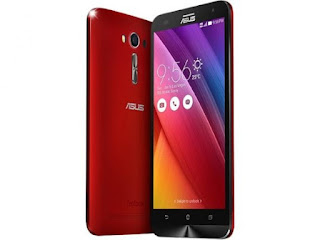 Asus Zenfone 2 Laser is a great device which will receive the Marshmallow treatment in an official manner. The firmware will be OTA released by Asus but until then, if you want to check how the new Android M runs on your device, you can try a custom ROM that’s based on stock Android 6.0.1 system. I am talking about an unofficial release of CyanogenMod, which can be anytime safely installed on your phone. So, what do you say, are you interested in trying out a fully optimized update that can improve the performances of your Zenfone 2 Laser?
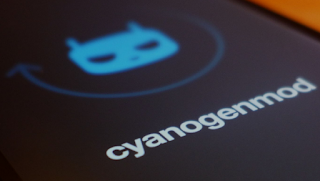 There is an unofficial CM 13 Android 6.0 Marshmallow build ready for the AT&T Galaxy S3 users to install. If you follow all the info listed in this post you will learn how to successfully flash this new custom ROM on your device.
 There is an unofficial CM 13 Android 6.0 Marshmallow build ready for the AT&T Galaxy S3 users to install. If you follow all the info listed in this post you will learn how to successfully flash this new custom ROM on your device.
 In this post you can find their BlissPop Android 6.0.1 Custom ROM installation steps. So, if you want to install this new Marshmallow AOSP / CM 13 hybrid custom ROM on your International Galaxy S3 LTE phone, then you should check all the instructions below.


